Docs
Explanations
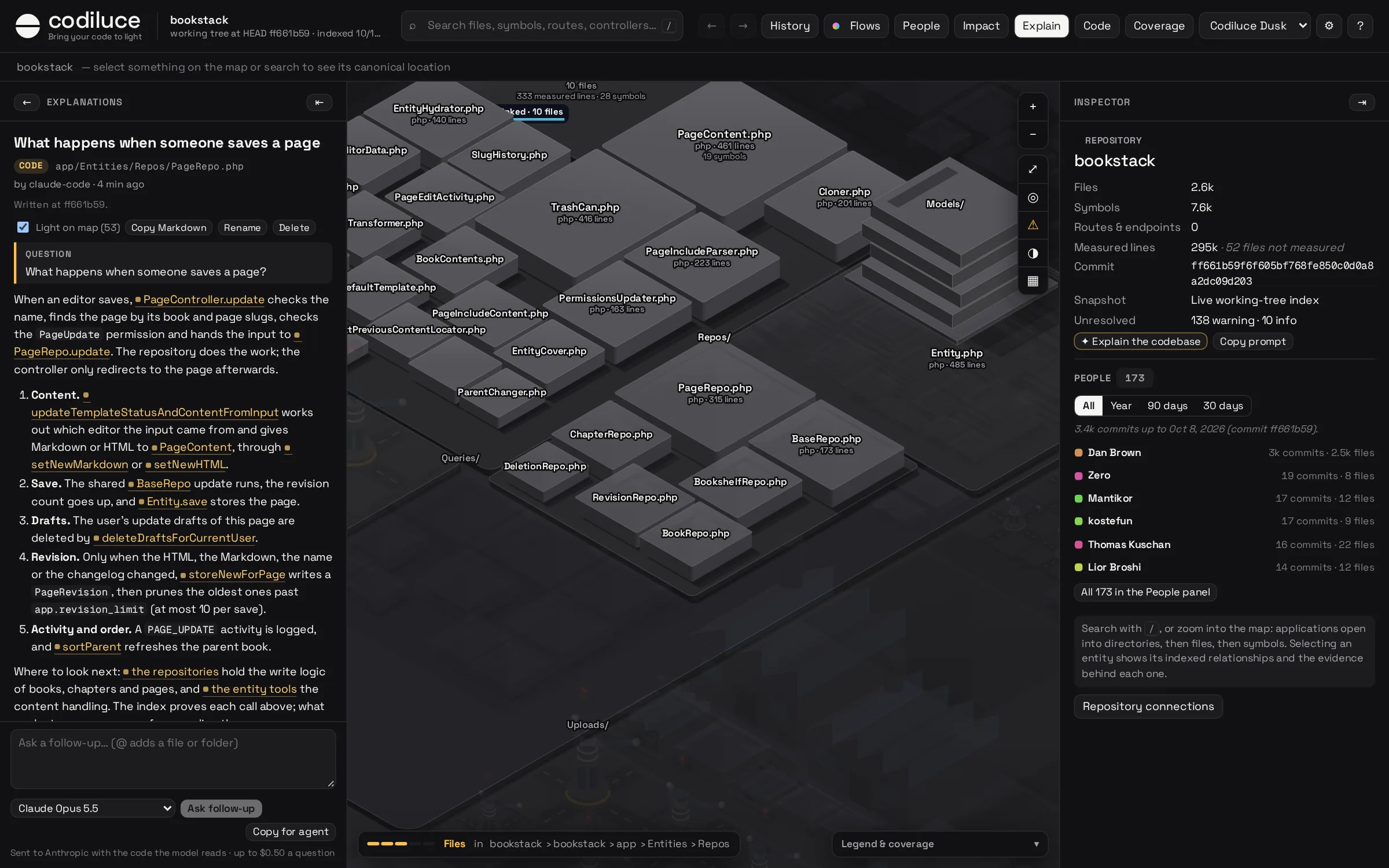
Ask your agent, or the map itself, to explain the code. The answer is saved in the map's Explain column, where every file, symbol and flow it names is a link: point at it and that code lights up on the map, click it to open it.
Connect your agent
Codiluce has an MCP server for agents. Add it once, from the repository:
# Claude Codeclaude mcp add codiluce -- npx -y codiluce mcp# Codexcodex mcp add codiluce -- npx -y codiluce mcp
Or let codiluce setup do it: on the first start it finds Claude Code, Codex and Cursor and offers to connect them. Other clients take the same command (npx with -y codiluce mcp) in their MCP configuration; the Connect your agent panel in the column shows the exact command for your setup. Then ask in your own words, for example "Use Codiluce to explain how checkout works, and publish it". Clients that support MCP prompts also get explain-codebase, explain-flow, explain-commit, explain-pr, explain-path and explain-impact.
The agent starts from what the code provably does instead of reading files one by one. Its tools read the index:
| Tool | What it gives the agent |
|---|---|
start_explanation | Say what it is about to explain, before reading the code: the map shows it at once, with your question and each tool the agent calls. Saves nothing. |
overview | The applications, their frameworks, the size, the flows by kind, the features, and the link syntax. |
search | Files, folders, symbols, routes, endpoints, tables, commands and tasks by name or path. |
entity | One entity: its description and feature, its symbols or contents, the flows through it, its relationships, what it does outside the code, who changed it, and the explanations that link it. |
relations | Its imports, calls, renders, requests across the frontend and backend, reads and writes. |
flows, flow | Every flow by entry point, and one flow step by step: lanes for a request, command or task, steps with their conditions for a page. |
impact | The blast radius, with the chain of relations that reaches each entity and what the walk cannot see. |
history, commit | Recent commits, the commits that changed an entity, and what one commit or merged pull request changed. |
source | The indexed source of a file or symbol, numbered. |
publish_explanation | Check every link, then save the explanation for the map. update_explanation adds a follow-up or rewrites it. |
While it works
You do not have to wait for the answer to know it is coming. While an agent works on an explanation, the Explain button pulses and the column shows a card: which agent, what it is explaining, your question, and each tool it calls, with how long it has been working. When publish_explanation saves the answer, the explanation takes its place. Codiluce's MCP server asks agents to call start_explanation first; an agent that skips it still shows its steps as it reads the code.
publish_explanation checks every link against the index first. A path that names nothing comes back with the reason, and nothing is saved until the agent fixes it. The server reads the index and writes only explanations.
Links
Explanations are Markdown. Links name code by repository-relative paths, which is what models already know, and every tool result carries the link to copy:
| Link | Names |
|---|---|
app/Http/Kernel.php | a file |
app/Http/ | a folder (its files light up) |
PageRepo.php#PageRepo.update | a symbol in its file |
Kernel.php#L40-L62 | lines of a file |
flow:POST /api/orders | a flow, by where it starts |
table:orders · commit:3fe7e5b · pr:42 · feature:billing | a table, a commit, a merged pull request, a feature |
Reading on the map
- Point at a link and only what it names stays lit, outlined. The map does not move; an arrow at the edge points to code off screen.
- Click it to open it: a file or symbol in the Code panel, a flow in the middle, a commit on the timeline.
- Light on map lights everything the open explanation links while you read it.
- Explained in, in the inspector, lists the explanations that link the selection, something inside it, or a folder holding it.
- Explanations about a commit or a pull request are marked on the timeline. Those about a flow show on the flow, and those about a file show in its inspector.
When the code changes
Each explanation is pinned to the commit it was written against, with a fingerprint of everything it links. When a later index differs, it says how many linked items changed or disappeared, and how many commits it is behind. Refresh asks the model to check what changed and rewrite it; Copy refresh prompt does the same through your agent.
Ask in the map
With an Anthropic or OpenAI key, the column asks a model directly, with the same tools and the same link check. codiluce setup asks for the key, checks it with the provider and keeps it in ~/.config/codiluce/credentials, readable only by you and never inside the repository. A key in the environment works too, and no restart is needed.
npx codiluce setup
- Type
@to attach files and folders. + Add to question in the inspector attaches the selection. - ✦ Explain in the inspector, on a flow or on a commit starts the question for you. Copy prompt copies it for your agent instead.
- Claude Opus 5.5, Sonnet 5.5 and Haiku 5.5, or GPT-6.1 Sol and GPT-6 Luna. Each question is capped at $0.50, and each answer records what it cost.
- The question, the attached code and what the tools return, including excerpts of source, are sent to the provider you choose. Nothing else leaves your machine.
Explanations are Markdown files in .codiluce/explanations/: readable, diffable, and yours to keep or share. serve --read-only refuses asking, renaming and deleting. More in the CLI docs.